
Step 1

In the upper right-hand corner of our HTML report that you are provided, click on the “Agent Tools” button and then click “Repair Request Builder”
Introducing Property Doc’s FREE “Repair Request Builder” – Included with every home inspection report we provide and makes repairs and negotiations simple again!
In the upper right-hand corner of our HTML report that you are provided, click on the “Agent Tools” button and then click “Repair Request Builder”
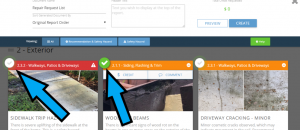
Click on the item you want to include in the repair request report, and then enter the amount you are requesting for this item.
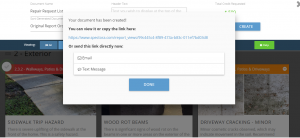
After previewing your repair request report, simply click on “Complete” and the report is generated automatically, and you can send it right from our system.
No more long and confusing email strings. No more issues lost or misunderstood by the other parties involved. Now you can have all your repair requests in one simple-to-use system. Brought to you by Property Doc!